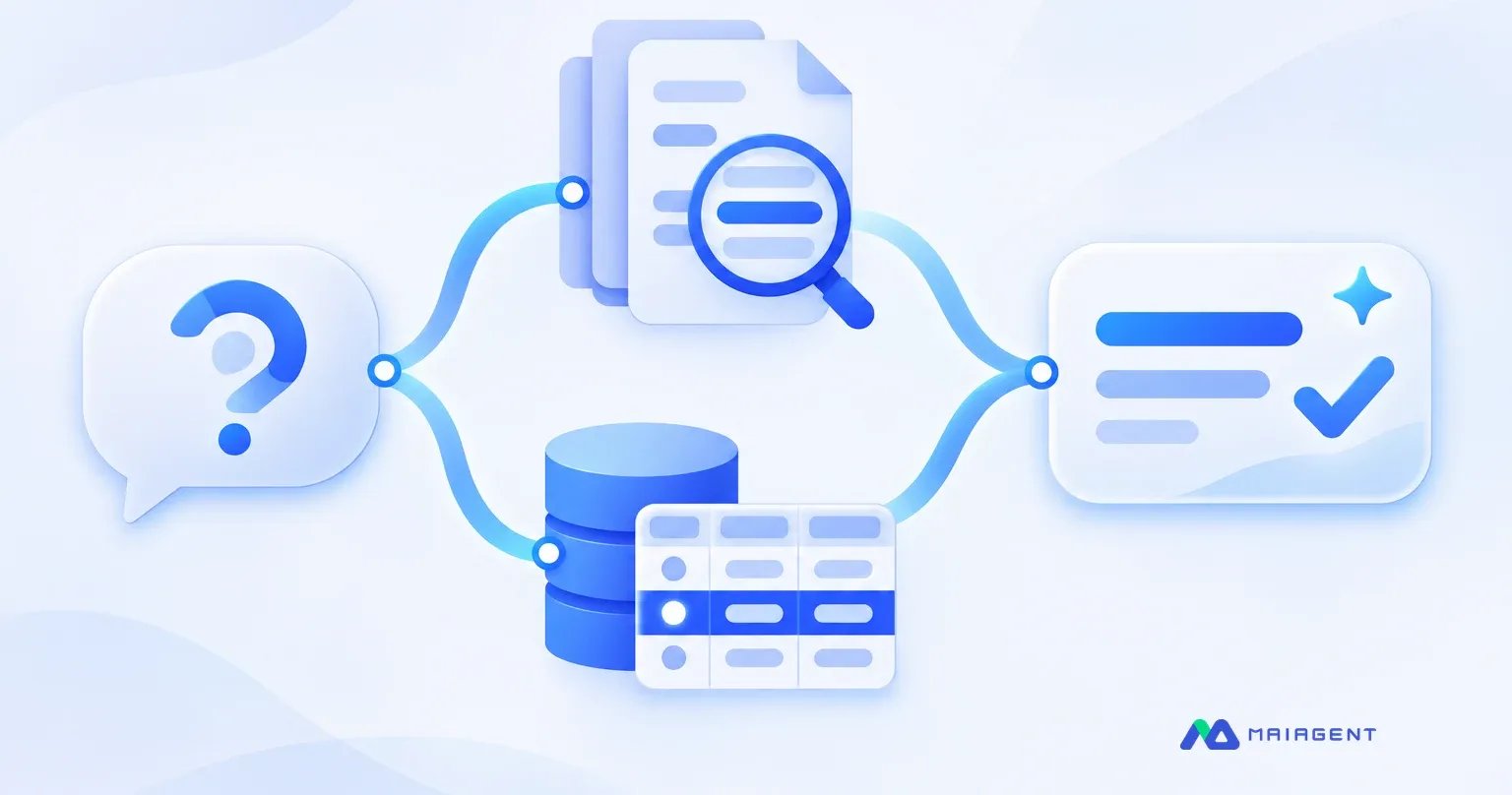
AI agents have two main ways to query enterprise data. Content in documents is handled by RAG (Retrieval-Augmented Generation), which first finds the passages relevant to a question and then has the model turn them into an answer. Numbers in databases are handled by Text2SQL (also written Text to SQL), which turns a question in everyday language into a SQL (Structured Query Language) query and pulls the result from the database. Both are general-purpose techniques, and companies usually connect both to the same AI agent.
1. Before an AI Agent Queries Enterprise Data, Separate Documents From Databases
Enterprise data falls roughly into two kinds. One is documents, such as contracts, policies, product manuals and meeting notes. Their content is written as text and is also called unstructured data. The other is tables, such as orders, inventory and expenses. These usually live in the databases behind systems like ERP, CRM and POS, and are also called structured data.
For document questions, the answer is usually already written in a passage somewhere. The warranty period is in the warranty terms, and the receipts needed for an expense claim are in the expense policy. The system's job is to find the relevant passages among many documents and build an answer from them. A question like "What was revenue last quarter?" is different. The answer is not written in any passage. It has to be calculated by filtering and summing order or accounting records in the database.
An AI agent connected only to documents can, at best, find a slide deck that mentions revenue when asked about it. That number may not be the latest, and it may not cover the time period or products the user had in mind. So when planning an AI agent, first look at which kind of data its questions depend on, then decide which data sources to connect.
2. What Is Text2SQL? From a Question to a Query Result
Text2SQL is a technique that turns a question in everyday language into a SQL query. Databases only accept SQL. In the past, getting data out meant knowing which table it was in and what the columns were called, then writing the query yourself. Text2SQL hands this work to a language model, in roughly four steps.
| Step | What happens | Example: "Which product sold the most last month?" |
|---|---|---|
| 1. Read the schema | Read the tables that can be queried, with their column names and descriptions | Find the orders and products tables, and learn which column is the order date and which is the quantity |
| 2. Generate SQL | Decide which columns to filter, sum and sort, and write the query | Filter last month's orders, sum quantities by product, sort from highest to lowest |
| 3. Run the query | Send the SQL to the database and get the result | Get the products with the highest sales volume |
| 4. Write the answer | Reply in everyday language based on the result | Reply with the top-selling product and its quantity |
The first step directly affects whether the answer is right. The model can only infer what the data means from column names and descriptions. If an amount column is just called amt, with no note on whether tax is included, the model has to guess. So before opening up queries, fill in the descriptions for tables and columns.
3. RAG vs Text2SQL: What Is the Difference?
RAG and Text2SQL both let an AI agent answer from a company's internal data instead of relying only on what the model learned in training. They differ in what data they search and how they find the answer.
| RAG | Text2SQL | |
|---|---|---|
| Data searched | Text content such as documents, manuals and web pages | Tables in a database |
| Good for questions like | What do the warranty terms say? Which receipts does an expense claim need? | Which product sold the most last quarter? Which part numbers are below safety stock? |
| How the answer is produced | Find relevant passages in documents and have the model turn them into an answer | Turn the question into a SQL query, run it, and answer from the result |
| How to check the answer | Compare it with the documents and passages it cites | Check which conditions the query used, or read the SQL |
| Common errors | Finding irrelevant passages, citing an outdated version of a document | Misreading what a term means, picking the wrong table or column |
| How scope is managed | Decide which documents each knowledge base includes | Decide which databases, tables and account permissions it can use |
When a question requires comparing several documents, you can go a step further with Agentic RAG, where the AI agent breaks down the question, searches in several rounds and then combines the results.
Further reading: Traditional RAG Is Not Enough: What Is Agentic RAG?
4. Who Uses Text2SQL? From Engineers to People Who Don't Write SQL
Getting data out of a database used to mean writing SQL yourself or asking someone who could. With Text2SQL, people who write SQL can have AI draft the query first, and people who don't can simply ask in everyday language.
| User | How they use it | Example |
|---|---|---|
| Engineers and data analysts | Have AI draft the query, check it, then run it | A reconciliation query that joins several tables |
| Analytics and BI tools | Built into the tool, to filter data and create charts from one sentence | Asking a dashboard for "monthly revenue trend by region" |
| Internal AI agents | Let colleagues who don't write SQL query data in everyday language | A sales rep asking "Which product sold the most last month?" |
Engineers and analysts can read SQL, so they can fix it when AI gets it wrong. Colleagues who don't write SQL can't tell where a query went wrong. Before opening it up to them, set the scope of what they can query and how answers will be verified.
5. One Question Often Needs Both: AI Agents Connect RAG and Text2SQL
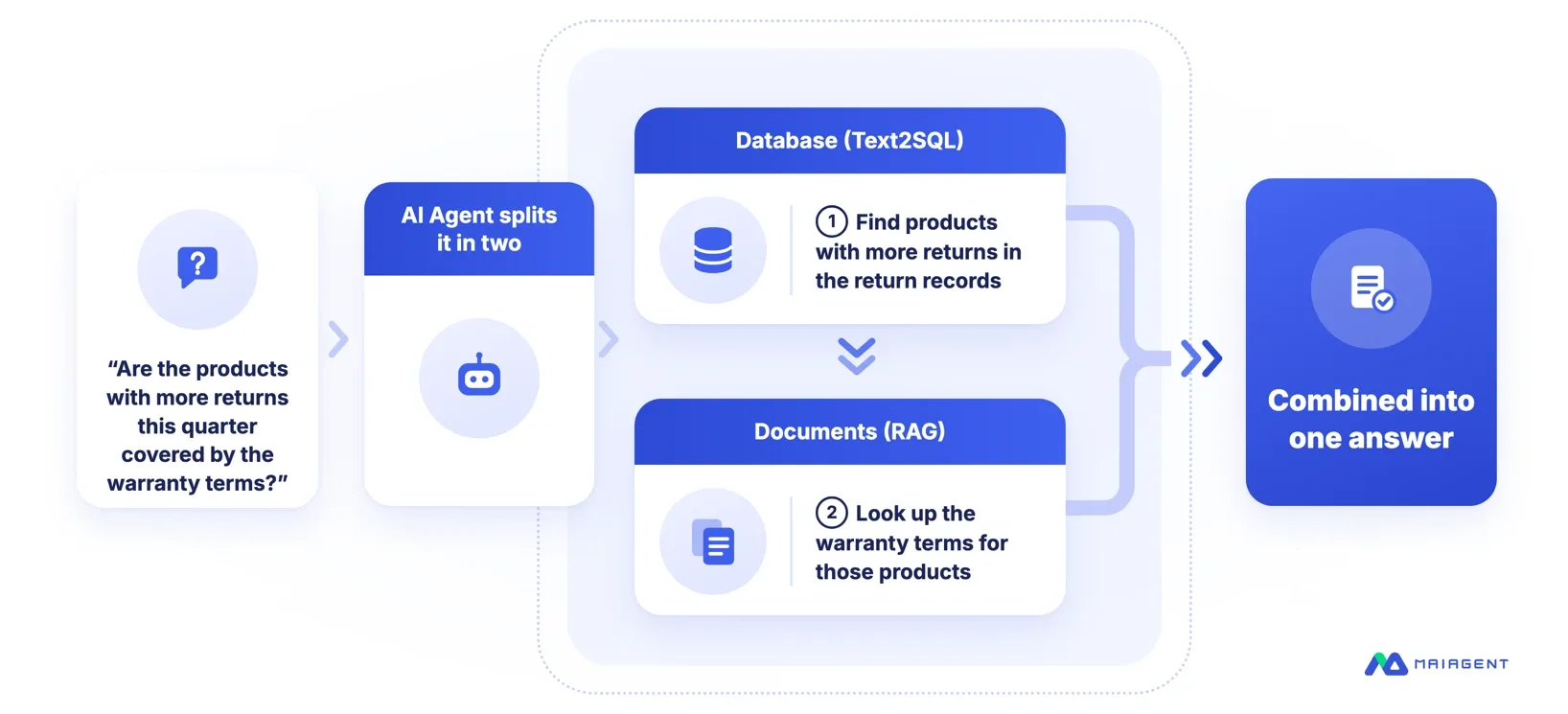
Real work questions often need both documents and numbers. "Are the products with more returns this quarter covered by the warranty terms?" The first half needs return records, the second half needs the terms document. "For departments over budget this quarter, which approvals does the expense policy require?" Again, half is in the database and half is in the policy.
For questions like these, the AI agent first splits the question into two parts and decides which part goes to the database and which goes to documents. In the returns example, it first uses Text2SQL to find the products with more returns in the return records, then uses RAG to look up the warranty terms for those products, and finally combines both results into one answer. Users don't need to know which system holds the data, or ask twice in two different places.
6. How AI Agents Connect to Data: The Role of Function Calling and MCP
An AI agent queries databases and documents through tools. Searching the knowledge base is one tool, and querying the database is another. Function Calling is how a model uses tools. The model decides which tool to use for the question and which parameters to pass, such as the time range of a query. The system then runs it and returns the result to the model, which turns it into an answer.
MCP (Model Context Protocol) is an open standard for connecting tools to AI agents. Once a tool is provided in the MCP format, you don't have to write a separate integration for each model, and connecting CRM, ticketing or other internal systems takes less integration work.
The more tools an AI agent connects to, the more data it can reach, and the more it matters to plan in advance what should and shouldn't be open. When evaluating a platform, check whether a single AI agent can query both knowledge bases and databases, which databases it supports (for example PostgreSQL, MySQL, SQL Server and Oracle), and whether you can upload Excel or CSV files to query.
Further reading: MCP and Agent Skills: Enterprise AI Integration
7. RAG and Text2SQL Use Cases Across Departments
A company's regular reports usually have someone maintaining them. Ad hoc questions the reports don't cover have to go to the data team. Questions about policies and processes often land on administrative staff or senior colleagues, who have to look through documents whenever someone asks. Once an AI agent is connected to both documents and databases, every department can look up both kinds of questions on its own first.
| Department | Documents (RAG) | Databases (Text2SQL) |
|---|---|---|
| Sales | What do the contract terms for this plan say? | Which product sold the most last month? Which customers haven't ordered in over three months? |
| Operations | What are the steps in the store opening checklist? | How does foot traffic at each store this week compare with last week? |
| Finance | Which receipts does a travel expense claim need? | Which departments are over budget this quarter? |
| Customer service | What does the warranty for this product cover? | What were the top three return reasons this month? |
| Procurement and warehousing | Which documents does a new supplier need to prepare? | Which part numbers are below safety stock? |
| Management | How is approval authority set at each level? | How do business units rank by revenue growth this year? |
Each department can also see different documents and tables. HR and payroll data are usually not open to most departments, so decide before opening up who can see which data.
8. Before Opening AI Agent Queries, IT Should Set the Scope for Knowledge Bases and Text2SQL
Even when departments query data on their own, the documents and tables AI can reach still need clear boundaries. If the prompt only tells AI "don't answer questions about HR data," a user may get around it by rephrasing. Scope should be enforced by what the knowledge base contains, the database connection and account permissions, not left to AI's judgment.
1. Connect each AI agent only to specific knowledge bases and tables
For a sales AI agent, the knowledge base includes only product manuals, pricing rules and contract templates, and the database exposes only the orders and customer tables. HR policies and payroll data are not connected at all. A single database often has hundreds of tables. IT can create separate AI agents by purpose, connect each only to the database it needs, and then expose only specific tables.
With fewer tables open, AI has fewer tables and columns to match when generating a query, so it is less likely to pick the wrong table or write the wrong query, and replies are usually faster too. The more relevant a knowledge base's documents are to the questions, the less likely AI is to find unrelated passages.
2. Connect with a read-only account so Text2SQL can't change data
Text2SQL should only read data, never write, modify or delete it. The most direct approach is to create a dedicated database account for AI with read access to specific tables only. Then even if AI writes a command it shouldn't run, the database itself will reject it.
Also consider what it connects to. Where possible, point queries at a read-only reporting replica or a data warehouse rather than the production transaction system, so heavy queries don't slow down daily operations.
3. Decide who can use which AI agent by role
Once the knowledge bases and tables are set, decide who can use which AI agent. The sales team uses an AI agent connected to product documents and sales data. The finance team uses one connected to expense policies, expenses and budgets. Sales can see sales figures but not HR data.
Users of the same AI agent usually have the same query scope. If managers and staff in the same department should see different data, a common approach is to create separate AI agents and database accounts for each.
4. Keep query logs so you can see who asked what
Every question, the documents AI cited or the queries it ran, and the final reply should all be logged. When an answer is in doubt, you can go back and check which document was cited or which query condition was wrong. During a security audit, you can also show who queried which data and when.
Further reading: AI Knowledge Base: 5 Ways to Prevent Hallucinations and Data Leaks
9. How Accurate Are AI Agent Answers? Verifying RAG and Text2SQL Before Opening Them Up
AI agent answers are not yet at the point where they need no checking, and document questions and number questions go wrong in different ways. RAG may find irrelevant passages or cite an outdated version of a document. Text2SQL may misread a term or pick the wrong table. For Text2SQL, BIRD, a benchmark widely used in research, sets questions on real databases. Data engineers and database students answer about 93% correctly, and the best AI system on the October 2026 leaderboard about 83%. Before answers reach the departments, put checks in place.
1. Agree on what terms like "revenue" and "last month" mean, and sort out document versions
The same word can be calculated differently in different departments. Does revenue include tax or deduct returns? Is "last month" a calendar month or a fiscal month? Is an "active customer" someone who ordered in the last three months, or someone who logged in? People reading a report automatically apply the definition they are used to. AI can only take the words literally, and if it reads them wrong, the numbers can be far off. Before opening up queries, write down the definitions of common terms and add them to the table and column descriptions, so that different people asking the same question get the same number.
On the document side, several versions of the same policy often exist side by side. Before opening up, remove old versions from the knowledge base or mark their effective dates, so the AI agent doesn't cite rules that are no longer in force.
2. Let users see the documents and query conditions behind each answer
Besides the answer, a reply should ideally show what it is based on. For document questions, include the name and passage of the cited document, so users can click through to the original. For number questions, include the conditions of the query, such as the time range, which products were filtered and whether returns were excluded. Users don't need to read SQL, but they can read conditions, and if something looks wrong they can rephrase right away. When users can see the basis for an answer, they are also more confident using it in a meeting or a reply to a customer.
3. Start with a POC in one department
A POC (Proof of Concept) is the most reliable way to verify, because it uses your own data. Pick a department with clear questions and stable data quality, and collect 30 to 50 questions they usually ask, covering both document and number questions. Have the colleagues responsible prepare the correct answers, then let the AI agent answer and compare question by question.
For each wrong answer, look at the cause. Was a document out of date, a term poorly defined, a column description missing, or is there a problem with the data itself? Fix it and run another round. After a few weeks, you will have numbers on the accuracy rate and the common types of errors, and a basis for deciding whether to expand to other departments.
Conclusion
When an AI agent queries enterprise data, first be clear about where the question's answer lives. Policies, terms and processes are written in documents, and RAG finds the relevant passages and turns them into an answer. Revenue, inventory and orders are stored in databases, and Text2SQL turns the question into a SQL query and answers from the result. Both kinds of question often appear in the same sentence, so internal AI agents usually connect both, then use Function Calling and MCP to reach the tools and systems they need.
After connecting the data, two things come before opening it up to departments: set the scope each AI agent can query, and verify its answers with your own data. Departments no longer have to wait on the data team for every ad hoc question, and the data team can spend its time on work that needs deeper analysis.
To see how an AI agent can connect to your company's documents, databases and permission settings, book a product demo through our website.
Frequently Asked Questions
Are Text2SQL and Text to SQL the same thing?
Yes. Text2SQL is short for Text to SQL. It is also written Text-to-SQL or NL2SQL, and all of them refer to turning everyday language into a SQL database query.
If we already have RAG, do we still need Text2SQL?
It depends on where your questions fall. If most of them are about policies and document content, RAG is enough. If they need to sum, sort or compare numbers in a database, you need Text2SQL. Most companies have both kinds of questions, so the two are often used together in the same AI agent.
What is the difference between Function Calling and MCP?
Function Calling is how a model uses tools, and MCP is an open standard for connecting tools to AI agents. They don't replace each other. A tool connected through MCP is still used by the model through calls.
Can Text2SQL change data in the database?
Not if it connects with a read-only account. When the database account only has read access to specific tables, the database rejects any modify or delete command AI writes.
Can Text2SQL replace BI reports?
Not entirely. They work best side by side. Metrics tracked every week are better suited to a BI (Business Intelligence) dashboard, where the calculation is consistent and everyone sees the same numbers. Ad hoc questions the reports don't cover can go to Text2SQL.
Can Text2SQL query Excel and CSV files?
Yes. Some platforms let you upload Excel or CSV files, which are automatically turned into tables you can query in everyday language. This suits teams that don't have a database yet, or want to try it first on an exported file.
How accurate is Text2SQL?
It depends on the data and the questions. On BIRD, a benchmark widely used in research, the best AI system in October 2026 answered about 83% correctly, compared with about 93% for data engineers and database students. A company's real accuracy can only be measured with a POC on its own data. Agreeing on term definitions and filling in column descriptions both help raise the accuracy rate.
References
- BIRD-SQL benchmark and leaderboard (test set leaderboard updated October 22, 2026)